Built by a sworn translator

The CAT tool
macOS deserved.

A native macOS CAT app with AI from six providers, Translation Memory, and nine quality checks — designed by someone who actually uses it every day.

Free plan available €3.99/month for Premium Requires macOS 15+
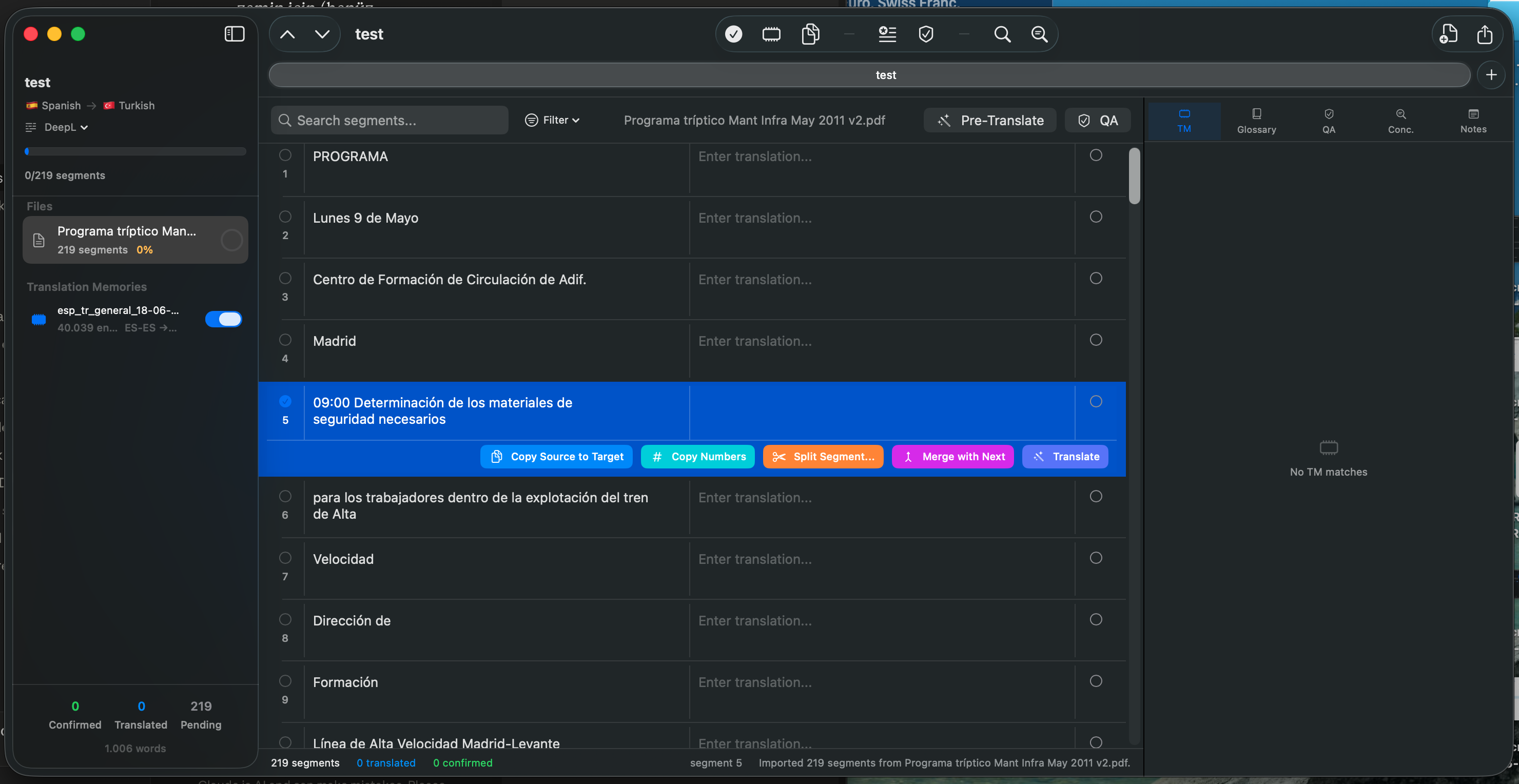
tradumacos — test.tradu
tradumacos editor showing a Spanish to Turkish translation project

Works with the formats you already use

DOCXMicrosoft Word
PDFPDF + OCR
PPTXPowerPoint
XLSXExcel
XLIFFIndustry standard
TMXTranslation memory
CSVBilingual data
TXTPlain text
Why tradumacos

A focused, Mac-native alternative.

tradumacos isn't trying to replace every Trados or memoQ workflow. It offers what most freelance translators actually need — without the Windows-first UI, the four-figure price tag, or the cloud lock-in.

Feature Trados Studio
Freelance
memoQ
translator pro
tradumacos
Premium
Native macOS app Windows only Windows only SwiftUI, Apple Silicon
Annual price (freelance plan) ~€295 ~€360 €47.88
AI providers built-in Add-ons / 1 MT engine Limited, plug-in based 6 providers + Local LLM
Local AI (offline) No No Ollama-compatible
Data stays on device Cloud-first Cloud-first Yes, by default
Setup time Hours Hours Minutes
Free tier 14-day trial only 14-day trial only Forever-free plan

Pricing as of 2026, based on publicly listed annual freelance plans. tradumacos is built for individual translators — agency-level features (server, multi-user collaboration) aren't part of its scope.

Everything a translator needs

Professional features.
Native implementation.

01

Translation Memory that
actually remembers.

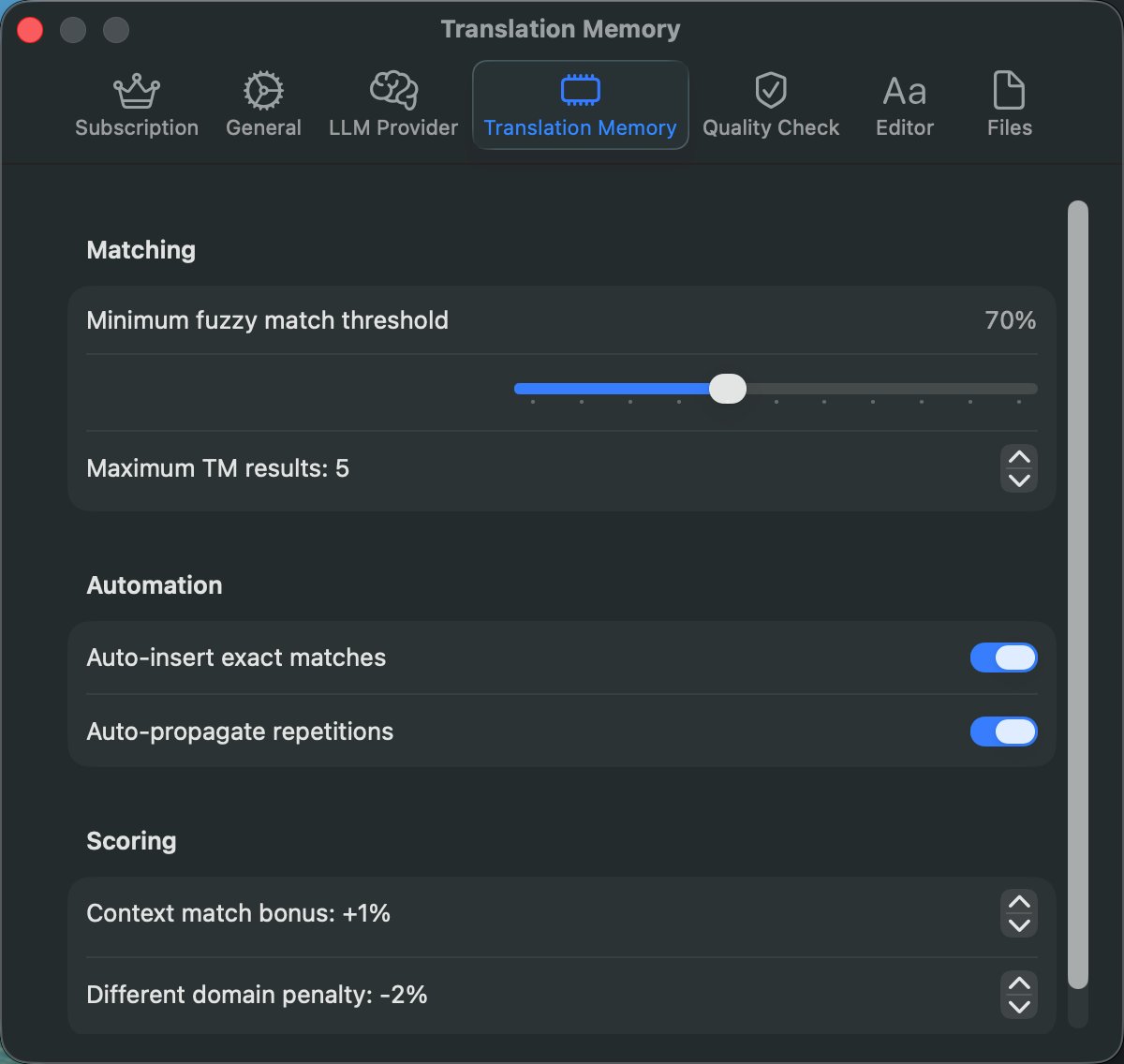
Every confirmed translation is stored automatically. Fuzzy matching with configurable thresholds finds similar segments from your past work. Exact matches auto-insert. Repetitions propagate across the file.

  • Fuzzy matching with adjustable threshold (0–100%)
  • Auto-insert exact matches as you work
  • Auto-propagate repetitions throughout the project
  • Concordance search across your entire memory
  • Import and export TMX files from any CAT tool
Translation Memory
Translation Memory settings panel
02

AI that understands
context.

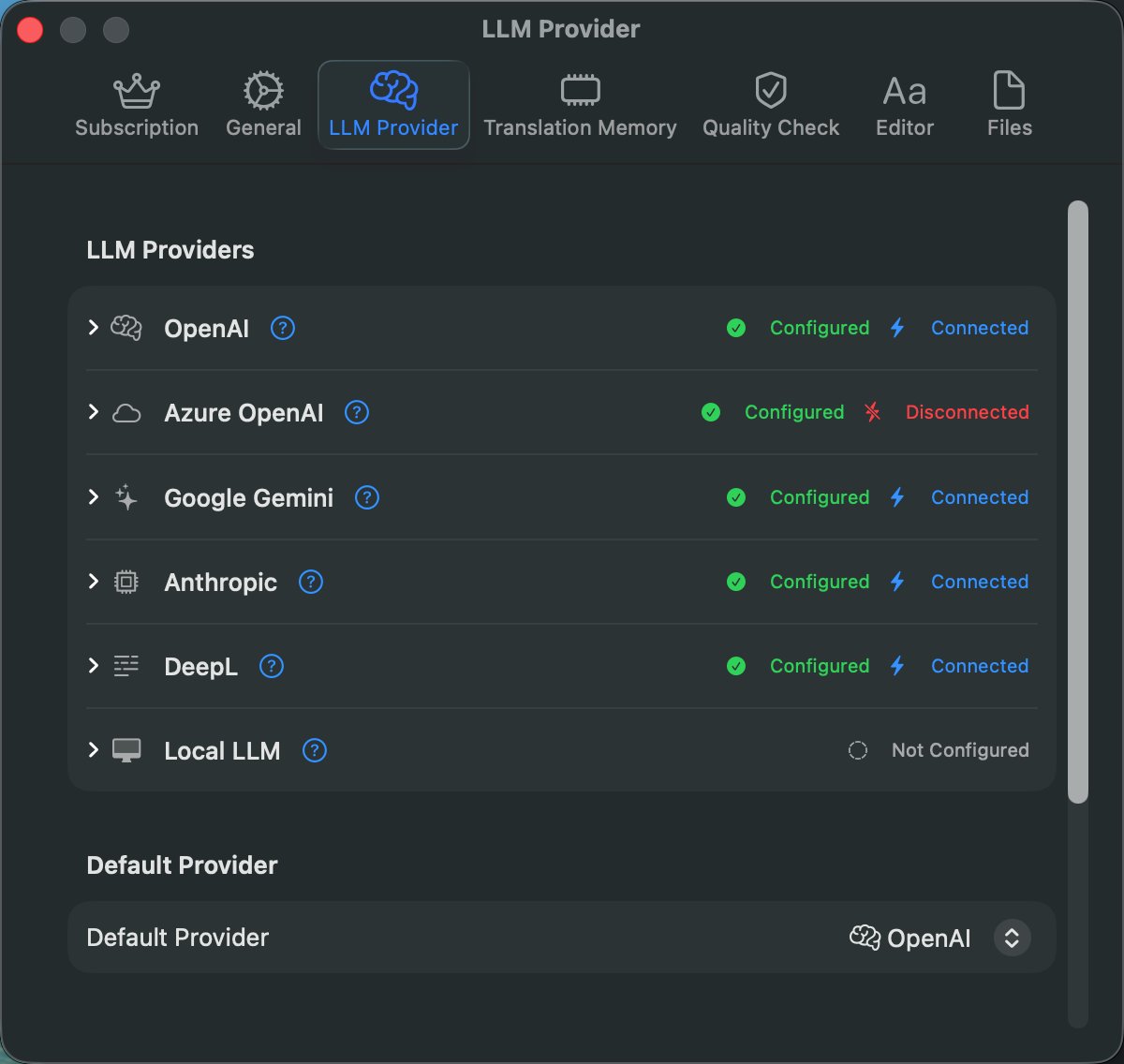
Connect to OpenAI, Anthropic, Google Gemini, Azure OpenAI, DeepL, or your own local model via Ollama. Every request includes glossary hints, TM matches, and surrounding segments — not just the source.

  • Six providers, one interface
  • Bring your own API key — data stays on your Mac
  • Pre-translate entire files in one click
  • Context-aware prompts with glossary and TM
  • Switch providers per project
LLM Provider
LLM Provider configuration showing six AI providers
03

Catch errors before
your client does.

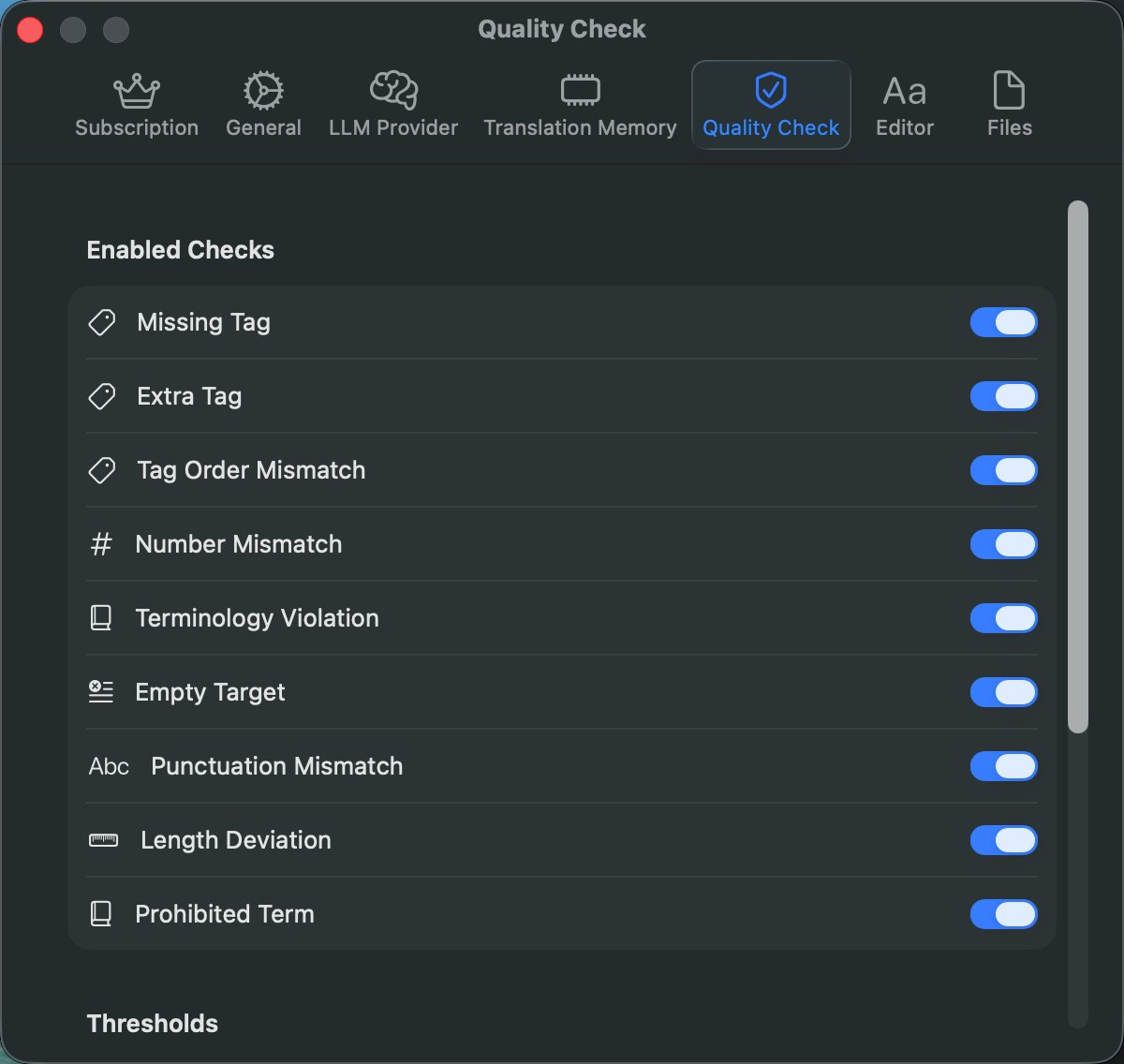
Nine built-in quality checks scan your translations for the mistakes that cost you re-deliveries: missing tags, number mismatches, terminology violations, and more.

Missing Tag
Extra Tag
Tag Order Mismatch
# Number Mismatch
📖 Terminology Violation
Empty Target
. Punctuation Mismatch
Length Deviation
Prohibited Term
Quality Check
Quality Check settings showing nine enabled checks
From document to delivery

Four steps. Done.

1

Import

Drop your DOCX, PDF, PPTX, or XLSX file. Formatting and tags are preserved automatically.

2

Translate

Use AI suggestions, Translation Memory matches, and glossary hints. Segment by segment, or batch.

3

Review

Run QA checks, work through the six-stage segment workflow, confirm and lock segments.

4

Export

Export to DOCX, PDF, XLIFF, CSV, or bilingual formats — with original layout intact.

Your AI, your choice

Six providers.
One interface.

tradumacos doesn't lock you into a single AI vendor. Bring your own API key — your translations stay on your Mac, your keys stay in the macOS Keychain.

OpenAI
GPT-4o, GPT-4 Turbo
Anthropic
Claude Sonnet, Opus, Haiku
Google Gemini
2.0 Flash, 2.5 Pro
Azure OpenAI
Enterprise deployments
DeepL
Specialized MT
Local LLM
Ollama, fully offline
Your API keys are stored in macOS Keychain. Your documents never leave your Mac.
9
QA Checks
6
AI Providers
8
Export Formats
7
Import Formats
4
UI Languages
100%
Native macOS
Simple. Honest. No surprises.

Start free. Upgrade when you need to.

Free

0 forever

Try the full editor with smaller files.

  • All seven import formats
  • Up to 30 segments per file
  • One AI provider of your choice
  • DOCX and bilingual TXT export
  • Translation Memory (view matches)
  • Six-stage segment workflow
  • Find & Replace, notes, concordance
  • Glossary, QA checks, batch ops, and pre-translate are Premium-only
Download free

Full feature breakdown

Free is a real working plan, not a trial. The limits below are the ones you'll actually run into — everything else is identical.

Feature Free Premium
Core editing
Import formats All 7 (DOCX, PDF, PPTX, XLSX, XLIFF, TMX, TXT) All 7 (DOCX, PDF, PPTX, XLSX, XLIFF, TMX, TXT)
Segments per file 30 Unlimited
Six-stage segment workflow Yes Yes
Find & Replace Yes Yes
Notes per segment Yes Yes
Concordance search Yes Yes
AI translation
AI providers 1 of your choice All 6 + Local LLM
AI pre-translate (full file) Yes
Context-aware AI prompts Yes Yes
Translation Memory
TM matching View matches only Auto-insert & propagate
TMX import & export Yes Yes
Fuzzy match threshold Configurable Configurable
Glossary & QA
Glossary management Full
QA checks All 9
Batch operations Yes
Export
Export formats 2 (DOCX, Bilingual TXT) All 8
Translated PDF Yes
Bilingual PDF Yes
Bilingual DOCX (3-column table) Yes
CSV export Yes
XLIFF export Yes
Native format injection (DOCX/XLSX/PPTX) Yes

I'm a sworn professional translator. I built tradumacos because the existing CAT tools were either prohibitively expensive, designed for Windows from the ground up, or both. I wanted something that felt at home on my Mac — and that I'd actually enjoy using every day.

Every feature in tradumacos comes from a real translation problem I encountered. Every shortcut is one I use myself. Every QA check has caught a real mistake in a real delivery.

Doruk Saraçoğlu
Sworn translator · Creator of tradumacos
Frequently asked

Questions, answered.

Is there a trial period for Premium?

Premium features are available immediately upon subscription. You can cancel anytime through the App Store — your subscription stays active until the end of the billing period.

Does tradumacos work offline?

Yes. Manual translation, Translation Memory, glossary, and QA checks all work fully offline. An internet connection is only required for cloud-based AI providers (OpenAI, Anthropic, Google, Azure, DeepL). For fully offline AI, use the Local LLM option with Ollama.

Where are my files stored?

All your projects, translations, and Translation Memory are stored locally on your Mac. tradumacos never uploads your documents to any server. API keys for AI providers are stored securely in the macOS Keychain.

What AI providers can I use?

OpenAI (GPT-4o, GPT-4 Turbo), Anthropic (Claude Sonnet, Opus, Haiku), Google Gemini (2.0 Flash, 2.5 Pro), Azure OpenAI, DeepL, and any local LLM via Ollama or a compatible endpoint. You bring your own API key for cloud providers.

Can I import my existing Translation Memory?

Yes. Import your TM in TMX format from any other CAT tool. tradumacos also builds TM automatically as you translate — every confirmed segment is saved to your project's translation memory.

What macOS version do I need?

tradumacos requires macOS 15.0 (Sequoia) or later. Both Apple Silicon and Intel Macs are supported.

How do I cancel my subscription?

Through the App Store: Account → Subscriptions → tradumacos → Cancel Subscription. Your Premium access continues until the end of the current billing period.

Do you offer team or enterprise plans?

Currently, tradumacos offers individual Free and Premium plans. Team and enterprise plans are on the roadmap. For volume inquiries, write to support@tradumacos.com.

What languages does the interface support?

The tradumacos interface is fully localized in English, Spanish, French, and Turkish. The languages you can translate are virtually unlimited — tradumacos works with any language pair supported by your AI provider of choice.

Translate smarter, today.

Free plan available. No credit card required. Built for macOS 15 and later.

Download for macOS